
Update 9 Sept 2010: This post has since become outdated! Please check out the updated post about using Gizmo5 and Google Voice for free calls
With Google Voice (what is Google Voice?) fulfilling more and more invitations, some more great news has recently been discovered (thanks cnr1109): you can now setup Gizmo (a VOIP application very similar to Skype) to make free incoming and outgoing calls using your Google Voice account – no longer do you have to “start†the call from the google.com/voice webpage (or similar). Not only this, but if you get a SIP/ATA device (devices used for Vonage/SunRocket/etc), you can plug it into your existing home phone line and have free calls from home without having to use your computer! And what else? it’s easy to setup:
1. Add your Google Voice number to your Gizmo5 account
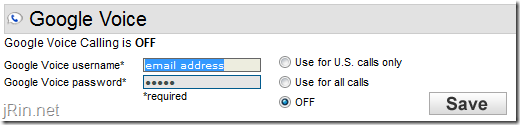
Login to your gizmo5.com account and enter in your google voice account information (if you are weary about giving them your gmail account information, which you shouldn’t be – but if you are, you can request your google voice account be associated with a different gmail address) Google Voice number:
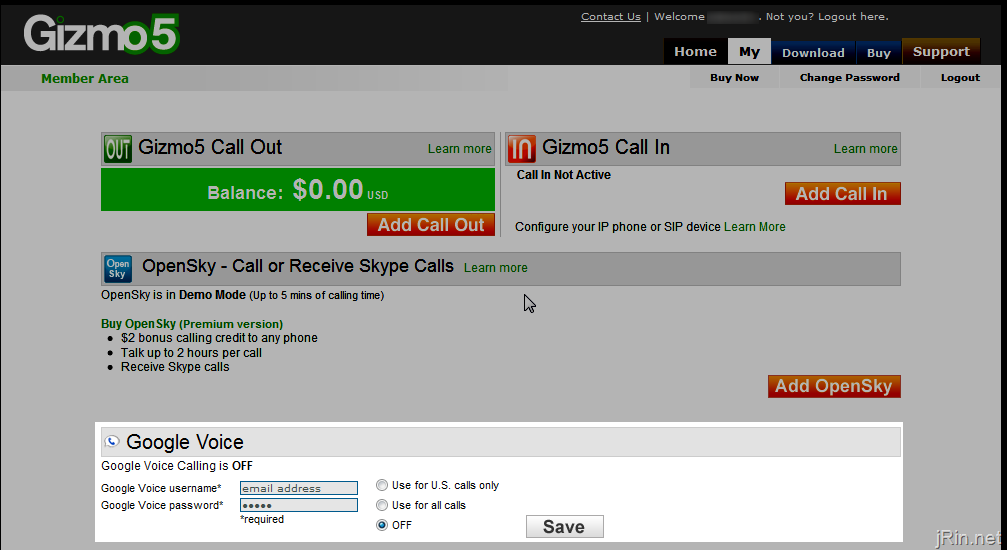
update 7/27/09 7:30pm est: There is now a notice on the page that this is an experimental service and calls will be limited to 20 minutes. They also provided a link to more information at www.gizmovoice.com:
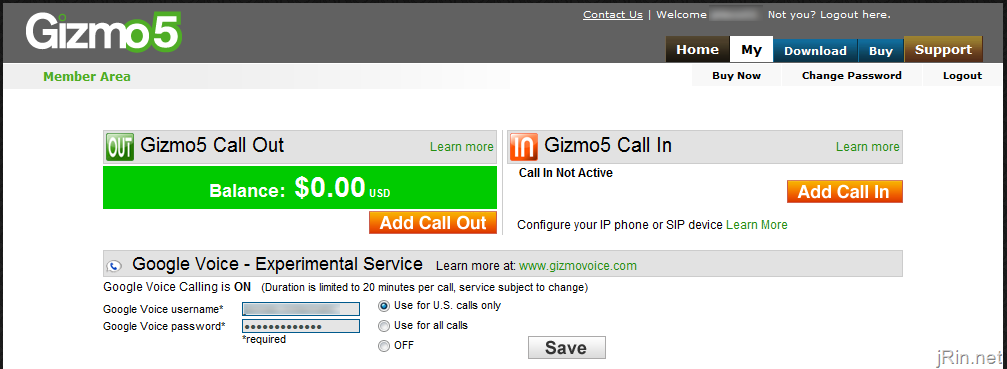
update 7/30/09: Now it is limited to 3 minutes of outgoing calls, unlimited incoming, and more – find out full details over at http://www.gizmovoice.com/ or http://gizmocall.com/:
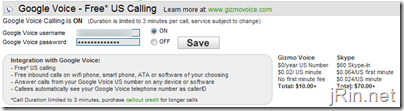
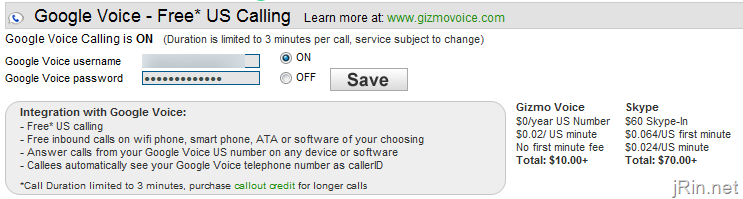
update 8/8/09: (how many more changes will there be!?) Now you no longer have to enter in your Google account credentials:
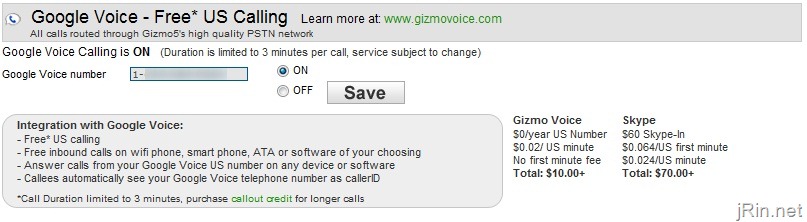
2. Add your Gizmo5 number to your Google Voice account (and verify it)
Login to Google Voice (http://www.google.com/voice) and add your Gizmo5 number (if you haven’t already):
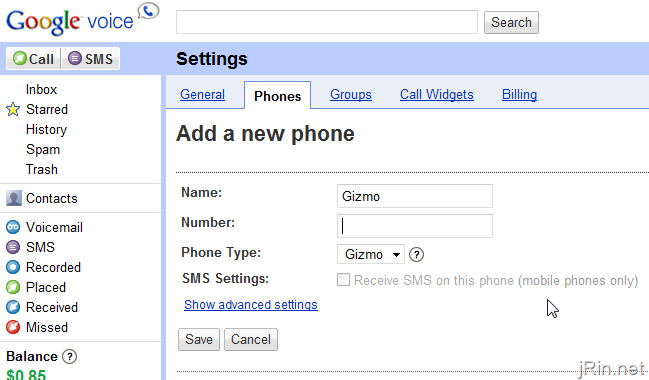
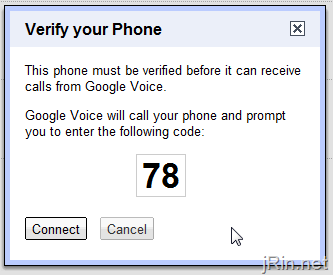
Once you click save, you’ll see a window pop up with a verification code. Make sure you have Gizmo installed and running on your computer, and then click ‘connect’ (tip: if having problems getting Gizmo5 to work in Windows 7, install AND run it [once installed] in Windows XP Compatibility mode):
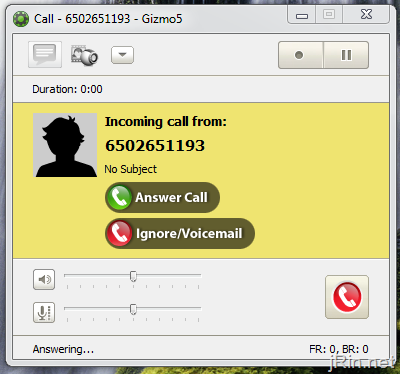
Answer the call within Gizmo (you do NOT need to be paying for Gizmo incoming call feature for this call), and then enter in the 2 digit code:
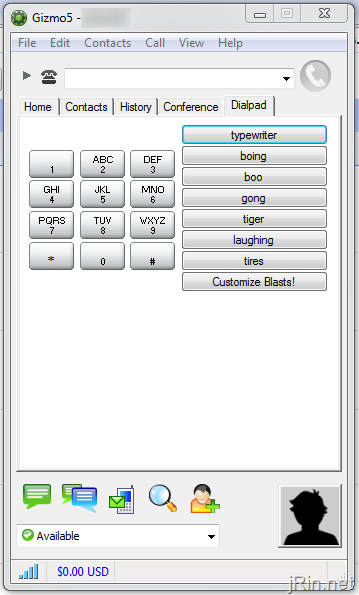
Now, at this point, you can now make free outgoing, and receive free incoming, calls from the Gizmo application (using your Google Voice number)!
3. Setup an ATA device for free calls using a land line phone
To be able to make/receive these free calls from an actual land line phone (using the “normal†phone lines in your house/etc), you will have to obtain a ATA \ PAP2 \ VOIP device. This is basically a box that you plug in to your router/modem and then you can plugin a normal phone line into this device. You then configure the device to work with your Gizmo account, plugin a land line phone (or, plug it into your home’s phone jack in the wall, and then any phone plugged into a different phone jack will work) and viola! Free incoming/outgoing calls using your land line phones.
Where can you find such a device? These are the devices that were/are used for such services like Vonage, the now defunct SunRocket, and the like. Here are a few examples of ATA devices (get already unlocked ones and save your self hassle):
- Linksys Sipura SPA-2100 (or basically any unlocked sipura model numbers) – ebay
- Linksys PAP2 – ebay
- InnoMedia MTA6328-2Re – ebay (not sure how to unlock these)
- Happen to already have an old SunRocket device (most likely InnoMedia)? Follow these instructions (thanks WorpX) to unlock & use with Gizmo5
Once you have a ATA device, here is the information you want to use to set it up to use your Gizmo account (how to access the admin panel of your device depends on the device):
- Username: your ten digit Gizmo number and country code [1 ### ### ####] with no spaces (you can find your gizmo number by logging into your http://www.gizmo5.com account, and it will be listed there as your “SIP Numberâ€)
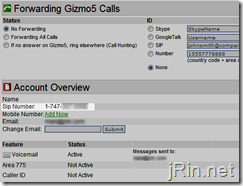
- Password: your Gizmo password
- Server: proxy01.sipphone.com (or, if you are having problems with hearing audio when receiving calls, try stun01.sipphone.com:3478 – thanks ccengineer)
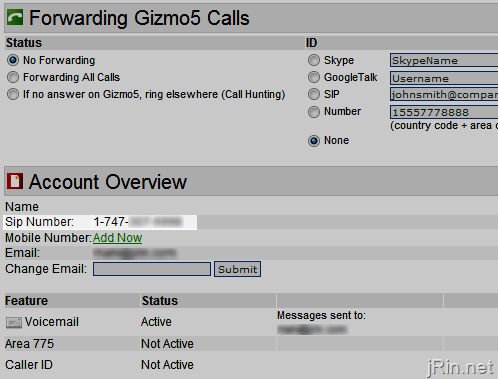
update 7/30: As mentioned earlier in step 2, Gizmo has now limited (free) outgoing calls to 3 minutes but still allowing unlimited incoming minutes. Here is the email I received this evening about it:
Gizmo Voice Moves from Experimental to Beta
Thanks for trying our experimental Gizmo Voice service. The viral spread of this service surprised us and we’ve received valuable feedback from many users on their experience of linking their Google Voice number to a Gizmo5 account so they can make and receive calls from wifi phones, ATAs, PC software and even a browser window using GizmoCall.com. Many of you have told us about the wide range of SIP devices you can now use to connect to Google Voice and we’re keeping a list of user suggestions of compatible wifi phones and software you might want to try out.
We’re now moving the service from Experimental to Beta and there are some important facts you should know:
- Gizmo Voice will remain a free service for Google Voice users to link their telephone number to a SIP account via Gizmo5.
- Unlimited incoming calls will be permitted to any SIP software or hardware.
- Free 3 minute calls to US numbers.
- All outbound calls will display your Google Voice CallerID.
- Longer calls will require a purchase of Gizmo5’s Call-Out which offers low per minute fees to all destinations.
- Unanswered inbound calls will use Google’s voicemail with unlimited online storage and free voicemail transcripts.
We hope you are enjoying the high quality VOIP service Gizmo5 has to offer, which includes unlimited calls to 800 numbers, other SIP networks, GoogleTalk users and even the ability to call a Skype user from any SIP device. (To test the SIP to Skype gateway call Try dialing 1-333-666-1111 which is the Skype echo line.) Gizmo5 is committed to user empowerment that comes from the use of open standards and interconnected services.
Any questions!? Have better ATA devices to use? Feel free to ask in the comments!
I have Linksys phone adapter SPA2102-R (old sunrocket) device. How can configure this with GV+ G5 + PhoneAdptor =Free service.
Please explain me.
@james, have you unlocked it yet? If not, here and here appear to be good sources for unlocking it in order to input the Gizmo5 info – are you asking how/where to configure it for Gizmo?
Does the computer need to be on or does this completely work off the ATA for both incoming/outgoing calls?
@Alan, no – if you use an ATA device, you do not need to use a computer. The ATA device basically becomes “the phone company”, and it is the only thing (well, that and your modem/router) that needs to be running
I have PAP2 device unlocked and I am using with Voicepulse. Can i use both at the same time?
thanks
@Akola, according to this post yes, you can
Can you have a regular phone working on your home phone line at the same time? Or does that get killed in this process?
would like to set up ATA as second line if possible- even if just for outgoing calls. Or can I just use computer as second line and still keep home phone line?
@sara, if you don’t plug in the ATA device into your phone jack in your house, then yes. You would just plug the phone you want to use for Gizmo/GoogleVoice into the ATA device, and keep your current ‘home setup’ as is.
Q1: in Gizmo5 google voice settings, what option do I select “use for US”/”Use for All Calls”/ or “OFF”?
Q2: Do I need to modify any other settings in gizmo5 windows app?
Q3: Using the gizmo5 windows app, how do I dial a number?
Thanks for your help.
What are the differences between the Linksys Sipura devices vs. the PAP2 devices? Advantages, disadvantages? Is one easier to set up for GoogleVoice/Gizmo?
@Bobby, 1) I would select “use for US” (if you are just planning on calling US – otherwise, you’ll be charged Google Voice rates, which is up to you if you think they’re good – you for sure don’t want to select “off”, otherwise it won’t work :) )
2) nope, no other settings you need to modify in the Gizmo5 app
3) if you open up the main Gizmo5 app “main screen”, you should see a tab for “dial pad” at the end (as well as “home”, “contacts”, “history”, and “conference”)
James, thanks for your help. I choose “use for all calls” in gizomo5’s google voice settings as I plan to make international calls. After the change when I dial an international number 011…234, it rings once and disconnects. From all the readings, I thought you could make free international calls with this method (ex. slickdeals users). Is that true?
@Bryce, I’m actually not sure – I’ve been reading through tons of posts to try to figure that out my self. I have 3 different ATA devices arriving at my place this week (pap2 and 2 sipura models), so either way I’ll be sure to let you know!
@Bobby, I don’t think it would be free international calling as it will still be using your Google Voice account to make the international calls. I’ve never tried it myself, so I don’t know for sure from personal experience – I’ll look into it and let you know if I figure it out
James,
Google voice does free calling only in the USA. International calls require credits. If you choose all calls, you need credit in your google voice account. If you choose US only, you need credit in your gizmo5 account to make int’l calls.
Don’t I have to pay Gizmo5 for a call-in number? How is this free?
@Zieee, ah that makes sense, thanks for the heads up!
@Ryan, you pair your Gizmo5 account (free) to use your Google Voice account (free)
@Akola – You could in theory from a hardware perspective, but Voicepulse locks the ATA so you can’t make admin changes. I believe this makes adding a 2nd provider impossible.
James, I must not be understanding your instructions then. In your post you say I have to “Add your Gizmo5 number to your Google Voice account”. What number am I adding here if not a call-in number (which I have to pay for)?
Thank you for the instructions. I set it up and it works great. One thing that I cannot find, which is shocking to me, is a firefox extension that will make phone numbers clickable and auto dial using the Gizmo5 client. Anyone know of a solution?
I use the Skype plugin to do this with Skype and since I’m now using GV would like to switch to Gizmo5. Thanks!
@Jeremy C, I just tried finding one too…looks like it indeed does not exist – However, there is a Google Voice extension which may do the same as you are wanting (since Gizmo uses your GV number anyway)
Thank you guyz. so i wont be able to use GV on PAP2. damm
it would have been slick. never mind.
@Ryan You add the Gizmo SIP number, not a call-in number, to your Google Voice account as one of your forwarding phones. Choose “Gizmo” as the type of phone.
@James Rintamaki, I found https://addons.mozilla.org/en-US/firefox/addon/5775 which will click to dial using x-lite, but I just tried x-lite and when making outbound calls get the “you need gizmo credit” message. I was hoping the new feature wouldn’t be restricted to only the Gizmo5 client, but any client configured with my gizmo info. Guess not.
I do use the addon you mentioned (although I see I need to update from b4 to b5) but thought there must be a Gizmo specific addon. No big deal. That should work fine.
I set up Google Voice with my Gizmo5 number, and I set added my Google Voice number both as my home phone number and as a contact in Gizmo5- not planning to use an ATA, but would like to be able to call using my Google Voice number for free, but when I call the number it shows the money sign in the call window…
So I need to set up the GV # as a SIP# (#########@googlevoice.com or the like)?
I am having the same problem that Ryan is having. When I go to add my SIP in google voice it fails when trying to verify it. If I call my SIP # from my cell phone I get a recorded error that “the call could not be completed as dialed”. Can anyone tell me what to do ?
You cannot call your SIP number directly from a normal (cell, landline, etc) phone. When you put in your Gizmo in google voice, you are selecting Gizmo as the type, and you are entering in your 10 digit Gizmo5 number, correct? Do you get to the 2 digit verification screen where you can click ‘connect’?
@James I do see the screen with the verification code but GV fails to connect to my SIP
@Tyler, does GV it give you a specific error message or anything? I assume you have Gizmo up and running on your computer, waiting to receive a call?
@James and yes I do select Gizmo as the type with my 10 digit SIP # (starts with 747). I get the verification screen with the 2 digit number but it does not connect
I think you have to start the SIP number with a “1”.
@Bryce I did
@Bryce, you know, you might be right – I just checked my settings in GV and see that it is “+1747307####”. @Tyler, can you try that and see if that fixes it? If so, I’ll update my post!
If your Gizmo SIP number is entered in correctly in GV, then there must be a problem with the setup in the client you are using with Gizmo.
@James it currently shows +1747XXXXXXX as my number. I edited it and removed the + and now i get the call but it does not verify my gizmo #
@Tyler, does it just basically time out and you get no notifications of any sort within the Gizmo5 app running? (what OS are you using?) Do you have your google voice number in any of your other settings within Gizmo5?
@James im using a program called siphone on my iphone. i enter the 2 digit code but it doesn’t recognize it
Different softphone clients sometimes have difficulty with the touchtones. You might want to try verifying on a computer with Gizmo client or X-Lite.
@Tyler, what Bryce said. Try using the Gizmo client to do the verification.
I dunno what to do. my GV # forwards to my cell phone. when I try to verify my Gizmo # it calls my cell phone (which I havent entered anywhere on Gizmos site so it must be calling my GV #)
ok i disabled google voice in the gizmo settings but when i try to verify the gizmo # it times out. i have the xp desktop client installed and im logged in
@Tyler – you need to have your google voice account entered in your gizmo5.com account page (and make sure it’t not ‘off’)
@James ok I reenabled it but I still can’t verify my Gizmo # in GV. The call goes through when I’m connected to my SIP client but doesnt recognize the 2 digit verification code
OK, I had already verified the Gizmo # in Google Voice. When I dial my GV#, it rings a couple times, pauses, the money icon pops up in the call window, it starts ringing again, and after a couple more rings it hangs up.
Can you describe exactly what the process is to use your GV# to make uncharged US calls from Gizmo5? I’ve been dialing the number in Gizmo5, but even if it connected, how would I enter the number I want to call? Or do I have to make the call from GV and choose the Gizmo as the phone?
I have Linksys SPA2102-R (old sunrocket) device. How can setup G5 in it? Please explain me process of steps.
You can’t use Gizmo5 with the Google Voice addon for firefox. It has to be a real phone number entered for the forwarding number. There’s no Gizmo support built in. So if anyone knows of any click to dial addon/greasemonkey script that will launch Gizmo to make the call please post it. Thanks.
Sry guys. I have to take that back. I just put in my Gimzo sip number… just the 7 digit number… and the GV addon works perfectly. Put it in as the forwarding number in the settings of the addon.
With this setup does caller ID work?
If you are having problems calling out using another client other than Gizmo5 or your hardware make sure that your user name is your sip number 1747####### and not your Gizmo user name. I had this problem using x-lite where it kept telling me I needed Gizmo out minutes to make calls. Changed the username setting in x-lite to the sip number and works as expected now.
My phone doesn’t ring for incoming calls. I have a Linksys PAP2T, set up seems ok since I can make outgoing calls without any problems. Gizmo5 log shows the call was forwarded. I did try stun sever, cannot even register with sever. any thoughts? Thanks.
Wow James, this is probably your hottest topic yet!